Another year of big changes. We moved again and bought our first home, a beautiful old American Foursquare in our old neighborhood. Astro was acquired by Slack in September, making it three straight years of September job changes. In November, we celebrated my daughter's 1st birthday, and parenting continues to be the most exhausting and rewarding part of my life. Here's the 2018 media that was the backdrop to my year1.
Books
I read a lot of average tech-adjacent non-fiction in 2018, none of which is worth recommending here. Resolving to read more fiction in 2019.
Music
Apps (iOS)
Apps (macOS)
Games
After reading Mattt's excellent NSHipster article on building the fledgling Swift Language Server Protocol project, I scrolled back up and stared at Step 0: Install Xcode. It didn't seem strictly necessary, based on what followed. And as I’m sure you’ve deduced by the title and existence of this post, it’s not. Below is a short step-by-step guide to building and running the Swift Language Server Protocol on linux1. The following instructions assume either a basic understanding of a unix-style command line and/or a willingness to copy and paste superuser commands from the internet into your terminal program of choice.
- Install VS Code by following these instructions: https://code.visualstudio.com/docs/setup/linux
- Make sure that you have all the necessary dependencies installed:
$ sudo apt install curl git clang libsqlite3-dev libblocksruntime-dev libncurses5-dev
- Download the recommended Swift development toolchain from swift.org or via the command line:
$ curl https://swift.org/builds/development/ubuntu1804/swift-DEVELOPMENT-SNAPSHOT-2018-12-07-a/swift-DEVELOPMENT-SNAPSHOT-2018-12-07-a-ubuntu18.04.tar.gz > ~/swift-DEVELOPMENT-SNAPSHOT-2018-12-07-a-ubuntu18.04.tar.gz
- Extract the toolchain and move it to
/usr/local/bin:$ sudo tar xzf swift-DEVELOPMENT-SNAPSHOT-2018-12-07-a-ubunutu18.04.tar.gz -C /usr/local/bin
- Add Swift to your command line path:
$ export PATH=/usr/local/bin/swift-DEVELOPMENT-SNAPSHOT-2018-12-07-a-ubuntu18.04/usr/bin:"${PATH}"
Now, let’s run $ swift --version to make sure that we’ve downloaded and installed Swift correctly. You should see this output (or similar, depending on the version of the toolchain you installed):Swift version 5.0-dev (LLVM b10ce3d642, Clang c1979d7668, Swift 94b167db75)
Target: x86_64-unknown-linux-gnu
- Clone and build Apple’s sourcekit-lsp project:
$ git clone https://www.github.com/apple/sourcekit-lsp.git
$ cd sourcekit-lsp
$ swift build -Xcxx -I/usr/local/bin/swift-DEVELOPMENT-SNAPSHOT-2018-12-07-a-ubuntu18.04/usr/lib/swift
- Move
sourcekit-lsp and libSwiftPM.so to /usr/local/bin:$ sudo mv .build/x86_64-unknown-linux/debug/sourcekit-lsp /usr/local/bin
$ sudo mv .build/x86_64-unknown-linux/debug/libSwiftPM.so /usr/local/bin
- Install Node.js 11.x or newer:
$ curl -sL https://deb.nodesource.com/setup_11.x | sudo -E bash -
$ sudo apt-get install -y nodejs
- Generate the extension for VS Code:
$ cd Editors/vscode
$ npm run createDevPackage
- Install the extension you just created:
$ code --install-extension out/sourcekit-lsp-vscode-dev.vsix
- Point sourcekit-lsp at your installed toolchain in VS Code’s settings (File > Preferences > Settings > settings.json):
"sourcekit-lsp.toolchainPath": "/usr/local/bin/swift-DEVELOPMENT-SNAPSHOT-2018-12-07-a-ubuntu18.04/usr/bin"
- Reload your VS Code window (Control+Shift+P > Reload Window) or restart VS Code.
At this point, you’re all set up to use the Swift Language Server on linux. A few notes: you will see the most functionality for projects that have a Package.swift file that have been pre-built with swift build.
Let’s clone and build a sample project so we can see it in action:
$ git clone https://www.github.com/JohnSundell/Splash.git
$ cd Splash
$ swift build
Finally, open the Splash folder in VSCode and try some of the following to see it in action:
- Hover over a
struct name
- Command+Click to jump to a definition
- Type some code and invoke autocomplete
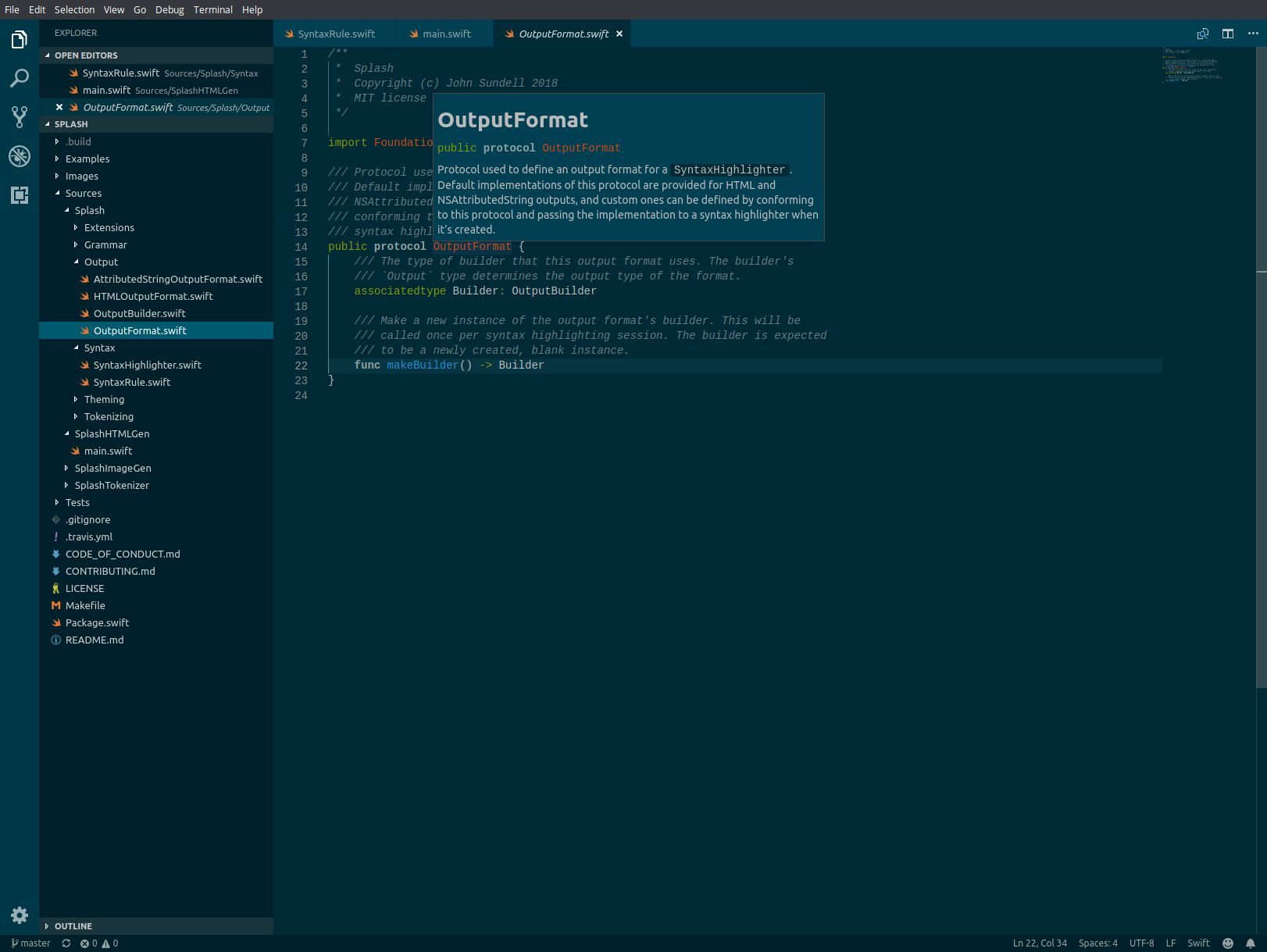
There has been a lot of enthusiasm around the announcement of this project, and for good reason. It serves as yet another reinforcement of Apple’s broad goals for the Swift programming language, which seem to extend further beyond the friendly confines of their own platforms with each passing year.
From my home office, I can hear the pleased squeals and shrieks emanating from downstairs. A stampede of thumping knees across the floor, a high speed chase.
Two years ago, an infant came screaming into our lives.
One year ago, my daughter was born.
This morning, I walked out my front door — to cast a vote for her future.
The past year has been challenging and rewarding, both personally and professionally. As usual I read, wrote, listened, and played about 1% of everything I wanted to. Here’s some of what I did get to, and enjoyed enough to recommend to you1.
Books
Music
Apps (iOS)
Apps (Mac)
Games
The Touch Bar, the headline feature of Apple’s new MacBook Pro laptops, is a mistake. It is a gimmick, a colorful whiz-bang toy “feature” designed to sell two-thousand dollar computers in Apple Stores. And it shouldn’t be the future of how we interact with macOS.
Apple’s marketing materials claim that it “revolutionizes the keyboard experience” and that it’s a “revolutionary new way to use your Mac.” Outside the reality distortion field, what they have created is an unholy amalgam1 of their (truly revolutionary) multi-touch keyboard and a traditional one. Simple, daily tasks like pausing a song or changing the screen brightness are transformed into a game of hide a seek, the sought after key constantly being moved out from under your fingers, hidden away in submenus accessed through inscrutable glyphs with tiny touch targets. The Touch Bar bastardizes the beauty of the touch interface — the naturalness of directly manipulating what is seen on the screen — by marrying it with the indirection of a keyboard, a device that we’re trained to not look at while we use.
In the rare case that the controls in the Touch Bar are more than visual representations of keyboard shortcuts, they tend to be interactions that are performed less clumsily with the trackpad. The icons themselves are like the shifting sands of the deserts, subject to the whims of the the Mac’s windowing system, making it impossible to commit any Touch Bar action to muscle memory. It is the most infuriating input device I’ve ever used.
If the Touch Bar isn’t the future of interaction on the Mac, what is? In the bad old days, when Apple was on the verge of bankruptcy and saddled with a legacy operating system it was Steve Jobs who rode in and saved the day with NeXTSTEP, a modern OS he had been building at NeXT. Unfortunately for Apple, the go-go operating system building days of the 1980s and 1990s have mostly passed, so the prospect of an outside acquisition showing the way forward is slim. Fortunately for Apple, they’re only a little over a decade removed from creating one of the most successful operating systems of all time.
macOS, despite the new name and fresh coat of paint is legacy software — iOS is now older than macOS was at the time iOS was introduced. It is an incredibly powerful, complex operating system with a lot of accumulated cruft. It has taken it’s particular vision of the traditional GUI as far as it can. If Apple believes in the long-term future of the Mac as a platform, they have to think differently about the underlying software.
Apple executives have spoken on the record multiple times over the past few years about having tried and ultimately dismissed the idea of touchscreen Macs. And with the operating system as it is designed today, it’s not hard to see where they’re coming from. It would be clumsy to interact with the nested menus and small controls of macOS by touch — they were designed for use with a much more precise pointing device, the mouse. But what if it wasn’t?
Apple should replace macOS with a new operating system built from the ground up to be touch-friendly. Not iOS2 with a clamshell keyboard, but something entirely new. An operating system that’s designed to be used with a touchscreen monitor and a physical keyboard. An operating system with the security and power efficiency of iOS, and the power and flexibility of the Mac. An operating system that is built from the ground up to integrate seamlessly with Apple’s cloud services. An operating system for the future of the Mac platform.